For the self-employed
Know what to set aside for taxes. Every week, not every April.
One spreadsheet for your income, expenses, mileage and quarterly estimated taxes. Every expense lands on the right Schedule C line, so tax time becomes a handoff instead of a scramble.
- Excel and Google Sheets
- Instant download
- One-time price, no subscription
Sound familiar?
Taxes on 1099 income sneak up on good businesses.
Nobody withholds anything when you work for yourself. Without a running number, it's easy to spend money that was never really yours and find out in April.
The April surprise
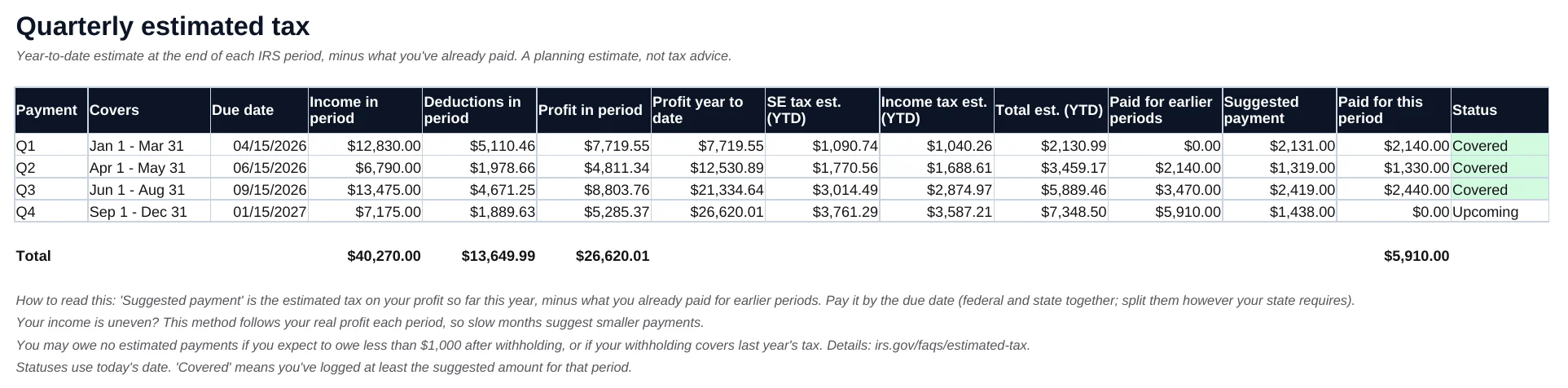
Quarterly payments are due four times a year on uneven dates. The tracker shows each one, what to send, and whether you're covered.
The shoebox of receipts
Log a receipt in seconds, pick a category, done. It sorts itself onto Schedule C lines and flags the receipts you haven't saved.
The miles you forgot
Business driving is often one of the biggest deductions for service businesses. Log each trip and the IRS rate for that date is applied for you.
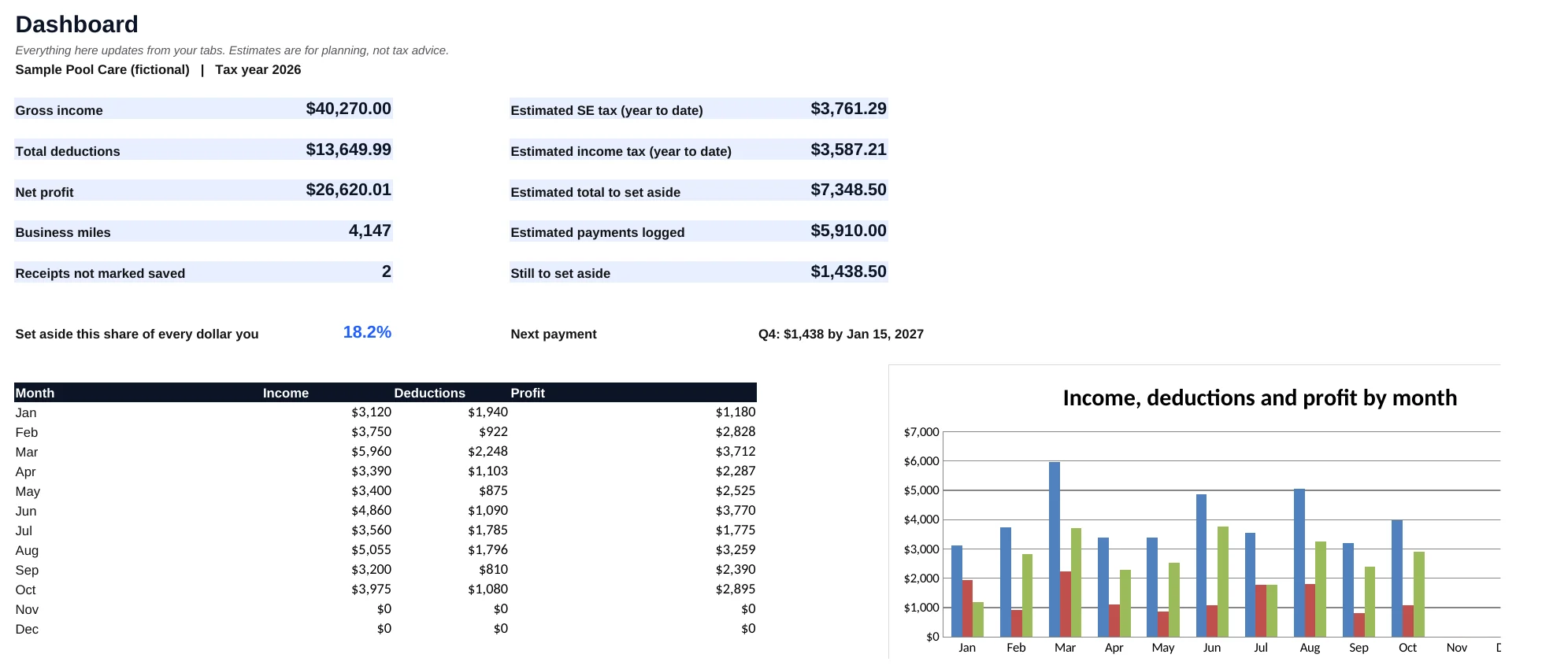
Your whole tax picture on one tab.
- Estimated SE and income tax, to dateUpdated every time you add a row.
- What to set aside from each dollarA simple percentage you can move to savings with every payment.
- Your next payment, amount and datePulled straight from the Quarterly tab.
Shown: the included sample file for a fictional pool-service business.
What's inside
Nine main tabs. Each one does one job well.
Yellow cells are yours to fill in. Everything else calculates on its own.
Dashboard
Income, deductions, profit, miles, estimated tax and what's left to set aside, with a month-by-month chart.
Income
Every payment, with the 1099 you expect, so January's forms are easy to check.
Expenses
28 ready-made categories, each mapped to its Schedule C line. Meals at 50%, business-use % and a receipt check built in.
Mileage
A trip log that applies the IRS rate for each date, including the July 1, 2026 change to 76¢ a mile.
Quarterly
The four IRS periods with due dates, a suggested payment for each, and a clear Covered or Due soon status.
Schedule C Summary
Your year by line number, lines 1 through 31, plus business miles for Part IV. The page your preparer wants.
Tax Payments
Every estimated payment and its confirmation number in one place.
Year-End Checklist
Sixteen things preparers usually ask for, so January is a checklist instead of a scavenger hunt.
Settings
Your rates, vehicle method and home office. IRS mileage rates for 2025 and 2026, Social Security wage bases through 2027 and due dates for 2026 and 2027 are filled in, all editable.
Quarterly payments, worked out for you.
Based on your actual profit each period, so a slow quarter suggests a smaller payment and a busy one doesn't catch you off guard.
Ten minutes to set up. A minute a day after that.
- DownloadOpen the blank file in Excel or Google Sheets.
- Set your ratesTax year, your federal and state rate, your vehicle method.
- Log as you goPayments, receipts and trips, one row each.
- Hand it offGive your preparer the Schedule C Summary and checklist.
Made for
People who'd rather be working than doing bookkeeping.
- Trades and home servicesContractors, cleaners, pool techs, landscapers, handymen.
- Freelancers and consultantsAnyone paid on a 1099 or through a payment app.
- Delivery and rideshare driversWhere mileage is the deduction that matters most.
- Side businessesKeep your side income separate from your W-2 job.
One-time price
$19
- Blank trackerExcel file, opens in Google Sheets
- Sample fileA full fictional year to learn from
- Quick-start guideA 4-page PDF
- Current IRS and SSA figuresMileage rates, wage base and due dates, editable
Secure checkout by Stripe. You'll go straight to your download.
Questions
Does it work in Google Sheets?
Yes. Upload the file to Google Drive and open it with Google Sheets. It also works in Excel 2016 or newer, Microsoft 365 and Excel for Mac. There are no macros or add-ons.
Is this tax advice?
No. It keeps your records organized and gives you a planning estimate so you can set money aside. Your tax professional still prepares and files your return, and they'll thank you for handing them clean numbers.
How does it estimate what I owe?
Self-employment tax is figured the standard way (92.35% of profit at 15.3%, with the Social Security cap). Income tax uses the federal and state rates you enter. It skips the standard deduction and credits, so it usually leans toward setting aside a little more than you'll owe.
I'm starting mid-year. Is it too late?
Not at all. Enter what you can from your bank and payment-app statements, and the Quarterly tab works out the rest of the year from there. The Q4 payment for 2026 is due January 15, 2027.
What about next year?
Due dates for 2026 and 2027 and the Social Security wage base through 2027 are already filled in. The IRS hasn't announced the 2027 mileage rate yet; when it does, add one row on the Settings tab. Save a copy each January, clear last year's rows, and change the tax year.
Who is it not for?
Businesses with inventory or cost of goods sold, payroll-heavy companies, partnerships and S-corps. It's built for sole proprietors and single-member LLCs filing Schedule C.
How do I get it?
Right after checkout you land on a download page with the files, and your receipt goes to the email you used at checkout. If anything goes wrong, email runmybizllc@gmail.com and a real person will sort it out.
Something else? Email runmybizllc@gmail.com. You'll hear back from a person, not a ticket system.